
FTM 2024 25.0.2 vs Previous Versions: What’s Improved
Not every update changes how a product looks. Some change how the user feels, and the FTM 2024 25.0.2 update falls into that category.
The update doesn’t introduce new features or major visible changes. So if you install it expecting something different, you might not notice much at first.
If you have already used the latest version of Family Tree Maker 2024, you have probably come across some of these issues:
- Notes not syncing properly
- Reports needing small adjustments
- Search results feeling slightly off depending on how you were working
This Family Tree Maker 2024 upgrade is meant to address those areas. It doesn’t introduce new features, but it improves how the existing ones behave. Over time, that makes a noticeable difference, especially if you work with large trees or sync your data often.
What Purpose Does the FTM 2024 25.0.2 Update Serve for Windows?
The 25.0.2 update is not a feature-heavy release. You won’t find new buttons to explore or new workflows to learn. Instead, the focus is on stability and consistency.
That might sound less exciting, but it helps users who use the software regularly.
Many improvements here are something you notice only after a few days of use. Things just work without needing a second attempt. The Family Tree Maker 2024 upgrade is a free update, and most of the changes reflect feedback from actual users. That’s why many of these fixes feel practical rather than technical.
Areas Where You Can Actually Feel the Difference
Rather than listing every fix, it’s easier to look at what changes from a user’s perspective.
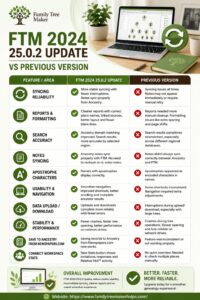
Syncing Has Become More Reliable Than Before
If you have been using Ancestry syncing, this is where you will feel the most significant difference.
Earlier versions worked, but not so smoothly. You might have noticed that sometimes notes didn’t appear right away or syncing needed a retry. It’s not a huge issue, but it can cause problems.
With the FTM 2024 25.0.2 Update, notes created in Ancestry show up properly. Uploads and downloads take place easily without interruptions, so you do not have to double-check things repeatedly.
If you sync your data often, the update can be worthwhile.
Reports Require Less Manual Cleanup
This update includes several adjustments to reports:
- Short place names in genealogy reports now appear correctly
- Ahnentafel Report source numbers are properly linked
- Burial-related sources are included without extra settings
- Users no longer need to click on “List non-vital facts separately”
- Sources for burial facts are now listed in the Descendant Report
Layout has also improved in the latest version of Family Tree Maker 2024.
Reports now contain fewer unnecessary blank lines, and notes don’t shift awkwardly to new pages. Newspaper source formatting has also been corrected.
Overall, reports need less cleanup after they are generated.
Other Small Family Tree Maker 2024 Upgrade Fixes That Make a Big Difference
It can be easy to overlook small changes until you realize they are no longer slowing your research down.
Here are some small but important 25.0.2 fixes that actually improve your FTM 2024 experience:
Ancestry Domain Matching
Search now follows the selected Ancestry region more accurately. Earlier, results sometimes felt mismatched, especially when working across different regional databases.
Ancestry Notes Syncing
Notes created in Ancestry now sync properly with Family Tree Maker. This means you don’t have to recheck or re-enter notes when switching between platforms.
This correction becomes quite noticeable if you maintain detailed research notes.
Apostrophe Character Issue
Names with apostrophes now display normally instead of appearing as encoded characters. This improves readability and removes confusion, especially when reviewing search results.
Web Search Data Autofill
Now autofill works properly even if the Windows account name includes spaces. It’s a small fix in the latest version of Family Tree Maker 2024, but it removes the need for repeated manual inputs.
Save to Ancestry from Newspapers.com
Saving records from Newspapers.com directly to Ancestry is now working. For users who rely on newspaper sources, this feature restores a previously inconsistent step.
Sync Error Improvements
Syncing overall feels more stable after the FTM 2024 25.0.2 update. Uploads and downloads complete with fewer interruptions.
This is especially useful if you sync frequently or work with larger datasets where interruptions were more noticeable earlier.
Usability Adjustments
Some everyday actions feel more natural now:
- Formatting shortcuts in Notes work even without selecting text first
- Scrolling in Family View is smoother
- The Ancestors filter returns complete results without manual tweaks
- UK users will notice that Ordnance Survey maps are available again
Stability and Performance
After using the FTM 2024 25.0.2 update for some time, you will notice:
- Fewer crashes during tree operations
- Better reliability for trees stored on network drives
- Faster opening of trees after restarting the software
- Improved performance when linked to Ancestry
Smaller fixes, such as media caption shortcuts and font consistency, also help features behave more predictably.
What Purpose Does the FTM 2024 25.0.2 Update Serve for Mac?
On Mac, most of the changes improve usability and address areas that didn’t behave consistently, particularly on newer macOS versions.
Installation
If you had trouble installing on newer macOS versions before, that’s been resolved.
With the latest version of Family Tree Maker 2024, the process is smoother now. Even small details, like button visibility in the installer, have been adjusted so things are easier to follow.
Data Sync and Search Is Now Consistent
Search results now match the selected Ancestry region properly and don’t get mixed up anymore.
Note syncing has also become more reliable, helping keep your data aligned between platforms.
Apostrophe display issues have also been resolved on Mac.
Media and Navigation
Media handling has become more flexible with this update.
You can now drag and drop files even if no media existed before. Earlier, that wasn’t always possible without extra steps.
Navigation is also more predictable:
- Keyboard tab switching works properly
- Shortcuts behave consistently across sections
- The description field no longer gets skipped
Interface Behavior
Some fixes may seem small, but they improve the overall experience over time:
- Dropdowns no longer close unexpectedly
- Login buttons respond properly
- Icons display correctly
- Toolbar buttons respond across the full clickable area
Connect Workspace Statistics Update
There is one visible addition in the FTM 2024 25.0.2 Update, and it is the addition of the Stats button in the Connect workspace toolbar.
This feature helps when you want a quick overview without navigating away.
It lets you quickly check:
- Invitations sent
- Responses received
- Relative Hint™ activity
For example, if you have shared your tree with family members, you can now easily verify who has responded. Earlier, the process required checking multiple places.
What Should You Do Now?
If you have already bought Family Tree Maker 2024 and use it regularly, then opting for the free update makes sense.
The improvement is not primarily due to new features of FTM 2024, but rather:
- Fewer issues
- Less confusion
- Better overall usability
Over time, you will notice:
- More reliable syncing
- Cleaner reports
- Fewer interruptions
- Smoother interaction overall
Take Assistance From Family Tree Maker Helps
If you need any assistance regarding the Family Tree Maker 2024 upgrade, getting support from Family Tree Maker Helps is very easy.
Whether your concern is about installation issues, syncing problems, or general guidance, you can connect with support agents in multiple ways.
Phone Support
You can connect directly by calling their support team. This is helpful if you need urgent assistance.
Live Chat Support
If you prefer not to call, they also provide a live chat option.
You can visit the support page on the website and click on the chat option to connect with an agent. It’s convenient when you want step-by-step guidance.
Remote Support
If the problem is complex and cannot be resolved through phone or chat support, a technician can securely access your system after you grant permission and fix the issue directly.
Remote Family Tree Maker 2024 Upgrade Support is especially helpful if you are not comfortable troubleshooting technical issues on your own.
Final Thoughts
The Family Tree Maker 2024 25.0.2 update might not look important at first glance. However, compared to previous versions, it feels more stable, consistent, and polished.
The update focuses on resolving smaller issues that interrupt regular use, such as:
- Syncing gaps
- Report inconsistencies
- Navigation behavior
After using it for some time, the software feels more dependable, and the workflow becomes smoother overall.
Frequently Asked Questions
What is the main purpose of the FTM 2024 25.0.2 update?
The update focuses on resolving sync issues, improving report formatting, and making everyday actions more consistent. It does not introduce major new features.
What is the new Stats feature in the Connect Workspace?
The Stats button provides a summary of activities such as invitations sent, responses received, and Relative Hint™ updates.
Has syncing improved in this update?
Yes. Syncing is more stable now. Notes from Ancestry appear correctly, and uploads or downloads complete with fewer interruptions.
What improvements have been made to reports?
Reports are cleaner and more structured. Place names display correctly, sources are properly linked, and layout issues such as extra spacing or page shifts have been reduced.
Is this update important for Mac users?
Yes. Mac users will experience smoother installation support, improved syncing, better navigation, and fixes for interface issues like dropdowns, icons, and login responsiveness.
Is this update necessary if everything is already working fine?
It’s not mandatory, but installing the update improves stability, reduces small errors, and creates a better overall experience. Plus, it is a free update.
Do I need an internet connection for support or syncing?
Yes. An active internet connection is required for syncing with Ancestry and for accessing support services, especially remote assistance.
Disclaimer
Please note that Family Tree Maker 2024 is designed for use only on Windows and macOS systems.
FTM 2024 is incompatible with Linux-based operating systems. Users planning to install or upgrade should ensure their device meets the supported system requirements.